
One tenner  the whole app two weeks free
  no contract
For bricklayers
Quote the wall before you leave.
You send the quote or invoice straight to their phone by text or email. It opens as a proper document with your name and colours on it, and they pay however you take it: card, bank transfer or cash. Easy for you to send, easy for them to pay.

Quotes · Invoices · Reminders · Bookings ·
Expenses · Certificates · Payments · Mileage ·
Gardenwalls,extensions,repointing.YourPAkeepsthediarystraight,warnsyoubeforeyoupromiseTuesdaytotwopeople,andfilesthesupplierreceiptagainstthejob.Nothingwaitingforyouafterwork.Youcanputyourfeetupknowingthateverythingistakencareofforyou.
What TradePA is, and what it costs
TradePA is an app for UK trades, including bricklayers, that does your admin while you talk. Say the job and it writes the quote, drafts the invoice, books it in the diary and writes the reminder when someone hasn’t paid. It gets the finished work signed off on your phone too. £10 a month, two weeks free.
The whole app. Every feature, no add-ons, and it does not go up when the work does.
No card, no contract. Put a real job through and see how TradePA can change your business.
A Job Completion Sign-off the customer puts their name to on your phone, so the work is agreed done before you invoice it.
Say it with your hands full
What you say, and what you get back
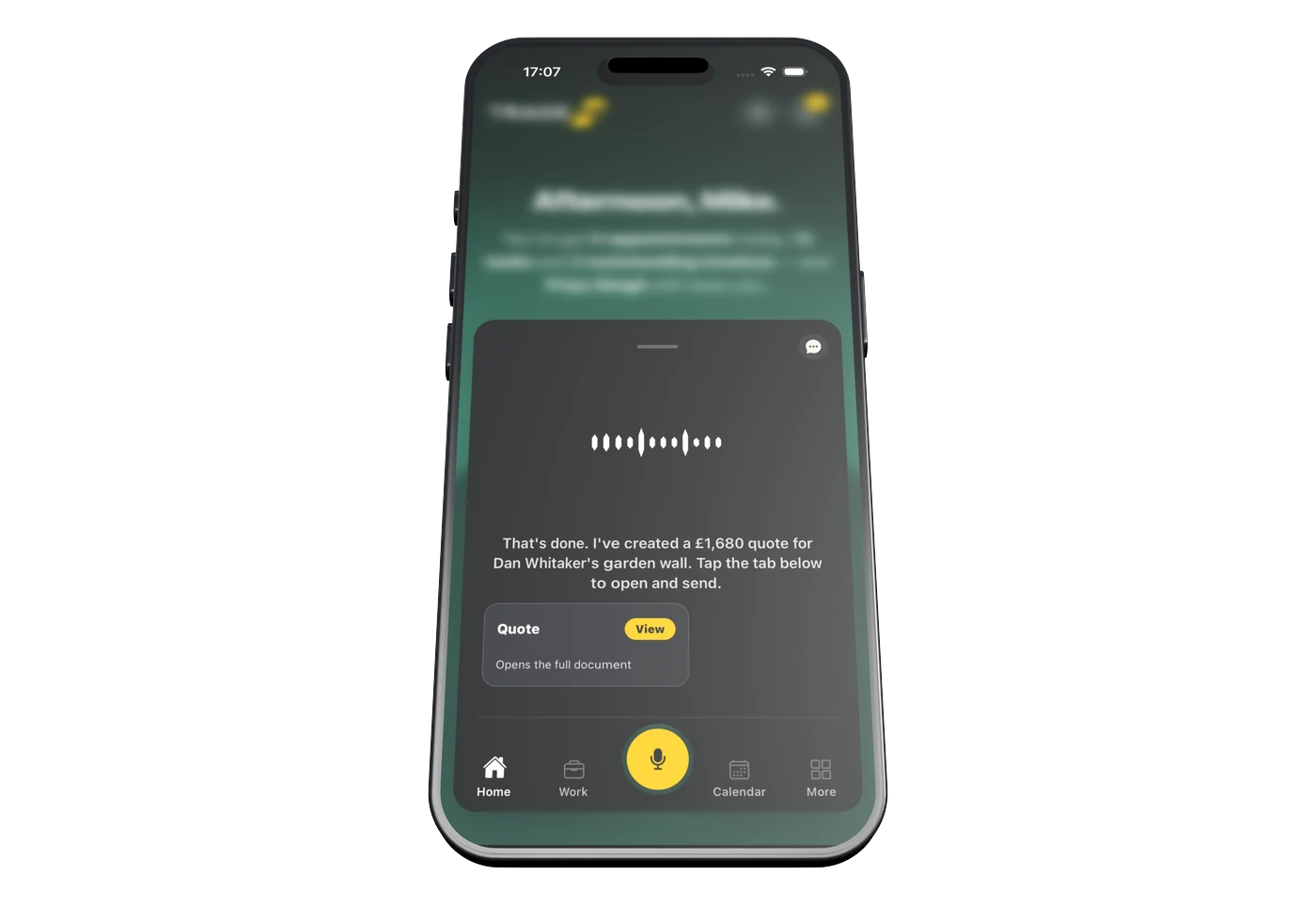
You say
“Quote Dan Whitaker fourteen hundred for the garden wall at 18 Meadow Rise. Eight hundred bricks.”
A £1,680 itemised quote with VAT and your logo on it. You preview your quote to make sure you are happy, before sending to your customer by text, WhatsApp or your own custom branded email.

You say
“What should I be charging for the repointing at Larch Avenue?”
Quote Helper shows what the job costs you and what your expected profit would be, allowing you to quote with ease based on your own cost and pricing data. Bricks, sand, cement, labour, each with your costs versus what you charge your customer. You see the margin before you send it, not after the job is done.

You say
“Meadow Rise is finished. Invoice him the fourteen hundred plus VAT.”
Your PA updates that job and drafts the £1,680 invoice, ready for you to preview and send.

You say
“Who still owes me?”
Your PA already knows. Every invoice you have sent, what has landed and what has gone past its date. Your Trade PA writes the reminder and you tap send. Nothing goes to your customer that you have not okayed.
The paperwork
Per thousand, per day, or per job
Three ways to price the same wall and they do not give the same number. Per thousand when you know the brick. A day rate when the detail is fiddly and nobody can tell you how long. A fixed price when you have laid it a hundred times. Whichever you pick, it goes on the quote in writing, and a sign-off at the end says the customer agrees it is finished.

500–600
Bricks a day is the honest ballpark most brickies work to, which is why a wall priced off the top of your head is a gamble. Quote Helper prices it off your own costs, so you see the margin before you send it, not after the job is done.
The sign-off
You talk to your PA, it writes the job sheet. Ready for them to sign.
01
It fills itself in
Your PA already has half of it
Pick the job and the customer, and the address and the work you logged come straight off it. Your PA asks you for whatever is missing and you answer as you would to a real person. The job sheet fills itself in as you talk.
02
Signed both ways
You sign it, then your customer does
You sign the job sheet where it needs it. Your customer can sign in person on your phone, or you email them a copy to sign on theirs. Once they have signed, the signed copy comes back onto the job for your records.
03
Kept for next time
It all stays on the job
Every quote, every invoice, every photo and the signed sheet all hang off that customer and that address. When they ring next year about the thing you did, it is one search, not a rummage through your camera roll.
The questions bricklayers ask us
Rates, retention, and the money that’s still out there.
Paperwork
There’s no CP12 for a wall. What there is, is proof — and it lives on the job.
Is there a bricklaying certificate in TradePA?
No, because there isn’t one to have. The certificates it holds are electrical and gas: EIC, EICR, Minor Works and CP12. The one that’s actually useful to you is Job Completion Sign-off, which needs no scheme membership. You sign, hand the phone over, the customer signs on the screen, and out comes a PDF with both signatures stored on the job.
How do I prove the DPC and the trays were right once it’s rendered?
Photograph it before it disappears. The DPC at 150 above finished ground, the cavity trays, the weeps, the ties. Send them to your PA in chat or add them from the job page and they sit on that job with the date on them. Six months later when there’s damp and everyone’s pointing, that’s your answer.
Where does the scaffold handover go?
On the job, as a photo or a note. TradePA doesn’t issue scaffold handover certificates or weekly inspection records. That’s the scaffolder’s paperwork and it should stay his. Snap the ticket and it lives with the job, dated, alongside everything else.
I subbie for a main contractor. Does it do CIS?
On invoices, yes. Switch CIS on, choose 20% or 30%, then tick which lines are labour. Only ticked lines get deducted, so your materials come through whole, and the deduction row shows on the invoice the contractor sees. If you’re on gross payment status, leave it switched off.
Does it file my CIS return?
No. It gets the deduction right on the document and stops there. If you pay your own gang you’re a contractor as well as a subbie, so the monthly return and the payment-and-deduction statements are still on you, both due 14 days after the tax month ends. Where it helps is getting the numbers out: accountancy integration, or a dated zip of every invoice and line item for your accountant.
Quoting
Say the rate the way you’d say it in the yard. It writes the quote.
Can I quote per thousand?
Tell your PA and it writes it. “Hey Cara, quote Dave’s garden wall, four and a half thousand bricks at seven hundred a thousand.” You get the line on your own template, your logo, your colours. If the maths hasn’t landed how you wanted, tap EDIT and change the price or the quantity in place. Nothing leaves your phone until you’ve read it.
Where do the muck away and the skip go?
On their own lines. “Add a line to Dave’s quote: 850 for muck away.” Keep it off the brickwork rate. When the dig turns up twice the clay anyone expected, you’ve got a line to vary instead of an argument about what the price included.
How do I stop guessing brick and block prices every time?
Put them in Your Materials once, named exactly how you buy them, so a 500 pack of facings is one item and a 25kg bag of cement is another. When you add materials to a job it asks what the cost and price cover, a whole pack or a single brick, so the line prices right. Anything you type on a job feeds back into the list, so it sharpens itself.
Am I actually making anything on this one?
Quote Helper will tell you. Pick a job and it pulls together the materials, the expenses and the notes, then shows what it costs you, what to charge and the margin. Green if you’re up, red if you’re not. It’s a guide, mind, not a quote: it won’t write the document for you, and anything with no price against it gets flagged so you can fill the gap.
Does it chase a quote for me?
It reminds you to. Five days with no reply and the job turns up on your list with the reminder already worded. You pick WhatsApp, text or email and it opens yours, so it lands from your number rather than from an app nobody’s heard of. There’s an eye icon on the quote too, showing how many times they’ve opened it. Opened four times and gone quiet usually means price, not silence.
Money & the day
Three ways brickwork loses money. Here’s what the app does about each.
It’s 3 degrees and falling. My whole week just moved.
Tell it and it moves. “Push the Oakfield start to Monday.” It shifts the diary, warns you what you’d be clashing with, and flags travel between two jobs that was never going to happen. It does not watch the forecast for you, and no app should pretend it knows whether you’re laying tomorrow. You make the call, it does the admin.
New build, 5% retention. How do I not forget it?
Raise it as its own invoice when it falls due. There’s no retention field, which is the honest answer, but a job can be invoiced in stages and it won’t show as paid until every invoice on it is settled. So the retention sits in your unpaid list with a due date, and once it’s late it gets flagged as overdue. Half at practical completion, the rest when the defects period’s up, both of them visible.
Can I take a deposit and invoice the rest in stages?
Yes. Mark a job part done and you get “Invoice for work done”; on a job you’ve already invoiced it becomes “Invoice next stage” and it works out the balance. The customer’s own invoice page shows job total, invoiced, paid and still to pay, so nobody mistakes a deposit for the lot. Mark all paid refuses if you haven’t invoiced the full value yet.
Do I still need the shoebox of merchant dockets?
No. Photograph one and it reads the merchant, the gross, the VAT and the rate, then files it under Materials against that job. It’s tuned for the ones you actually use: Travis Perkins, Selco, Wickes, Screwfix and Toolstation among them. Anything it can’t read comes back blank rather than invented, and you type that bit in.
Who owes me, without going through the book?
Ask it. “Who owes me money.” It has already worked out who’s past their due date, whose payment lands in the next three days, and which finished jobs you’ve not invoiced yet. They come at you one at a time, full screen, each with the button that fixes it: send the reminder, mark it paid, or skip for now.
One plan. The whole app.
TradePA
£10/mo
- Two weeks free, no card needed
- Every feature switched on, day one
- A tenner a month. That’s the whole price list.
- Cancel any time. No phone call needed.
