
One tenner  the whole app two weeks free
  no contract
For builders
Quote the extension before you leave the site.
You send the quote or invoice straight to their phone by text or email. It opens as a proper document with your name and colours on it, and they pay however you take it: card, bank transfer or cash. Easy for you to send, easy for them to pay.

Quotes · Invoices · Reminders · Bookings ·
Expenses · Certificates · Payments · Mileage ·
Extensions,loftconversions,gardenrooms.YourPAkeepsthediarystraight,warnsyoubeforeyoupromiseTuesdaytotwopeople,andfilesthesupplierreceiptagainstthejob.Nothingwaitingforyouafterwork.Youcanputyourfeetupknowingthateverythingistakencareofforyou.
What TradePA is, and what it costs
TradePA is an app for UK trades, including builders, that does your admin while you talk. Say the job and it writes the quote, drafts the invoice, books it in the diary and writes the reminder when someone hasn’t paid. It gets each stage signed off and invoiced as you go. £10 a month, two weeks free.
The whole app. Every feature, no add-ons, and it does not go up when the work does.
No card, no contract. Put a real job through and see how TradePA can change your business.
A Job Completion Sign-off the customer puts their name to on your phone, so a stage is agreed done before you invoice it.
Say it stood in the footings
What you say, and what you get back

You say
“Quote Mr Cassidy four thousand two hundred for the first fix at 4 Oakfield Road.”
A £5,040 itemised quote with VAT and your logo on it. You preview your quote to make sure you are happy, before sending to your customer by text, WhatsApp or your own custom branded email.

You say
“What should I be charging for the loft conversion at Meadow Rise?”
Quote Helper shows what the job costs you and what your expected profit would be, allowing you to quote with ease based on your own cost and pricing data. Materials, plant, labour and the trades you bring in, each with your costs versus what you charge your customer. You see the margin before you send it, not after the job is done.
You say
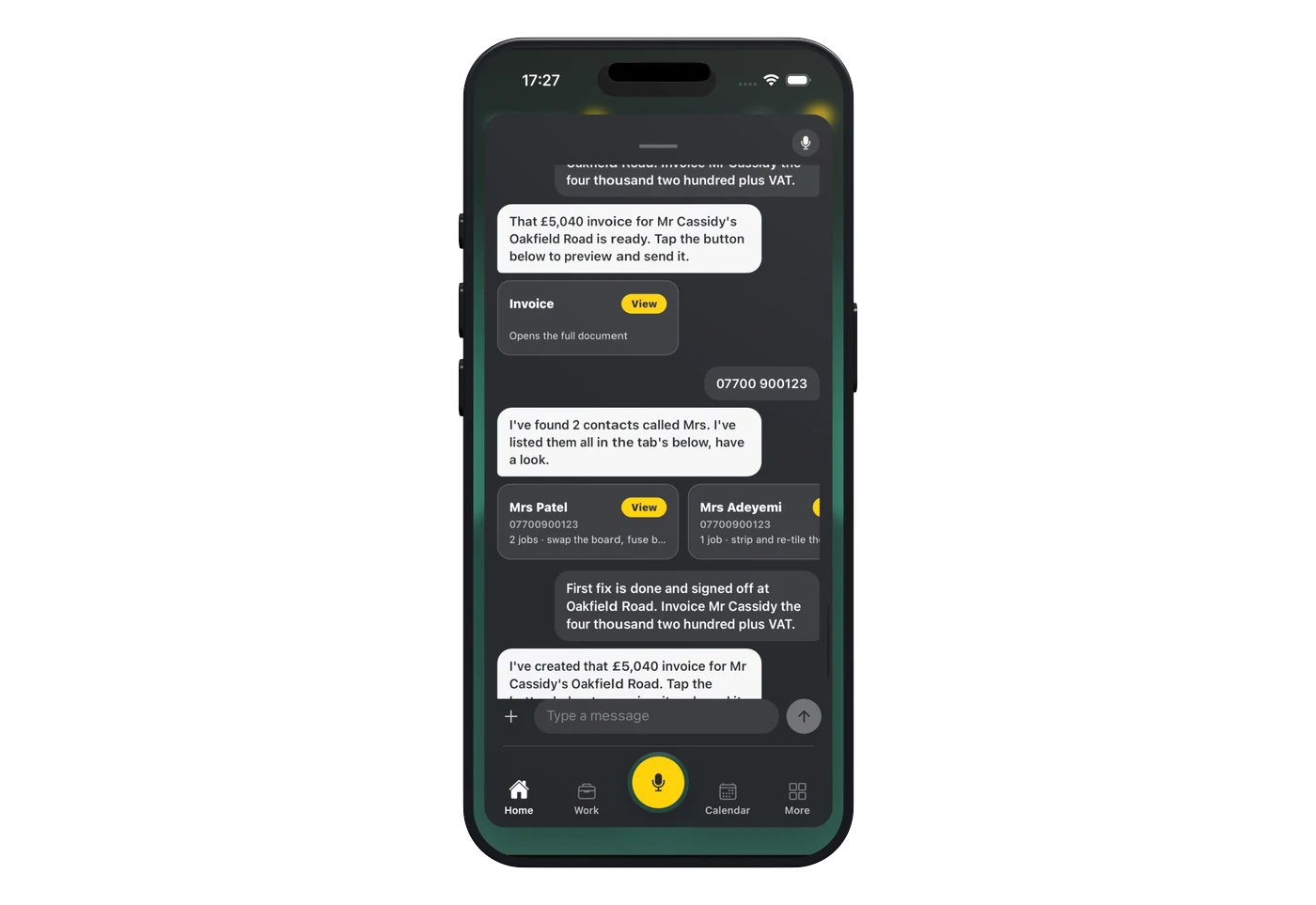
“First fix is done and signed off at Oakfield Road. Invoice him the four thousand two hundred plus VAT.”
Your PA updates that job and drafts the £5,040 invoice, ready for you to preview and send.

You say
“Who still owes me?”
Your PA already knows. Every invoice you have sent, what has landed and what has gone past its date. Your Trade PA writes the reminder and you tap send. Nothing goes to your customer that you have not okayed.
The paperwork
The money only moves when somebody signs
A big job is not one invoice, it is four or five, and every one of them is an argument waiting to happen unless somebody agreed the stage was finished. A sign-off the customer puts their name to on your phone, at the end of each stage, is the difference between getting paid on Friday and getting a phone call. Signed, dated and kept on the job.

30 days
The default payment term on a commercial invoice in the UK if nobody agreed one. On a job running in stages that is a long time to wait for money you earned in week two. Your PA drafts each stage invoice the moment you say that stage is done, and tells you the day one goes past its date.
The sign-off
You talk to your PA, it writes the job sheet. Ready for them to sign.
01
It fills itself in
Your PA already has half of it
Pick the job and the customer, and the address and the work you logged come straight off it. Your PA asks you for whatever is missing and you answer as you would to a real person. The job sheet fills itself in as you talk.
02
Signed both ways
You sign it, then your customer does
You sign the job sheet where it needs it. Your customer can sign in person on your phone, or you email them a copy to sign on theirs. Once they have signed, the signed copy comes back onto the job for your records.
03
Kept for next time
It all stays on the job
Every quote, every invoice, every photo and the signed sheet all hang off that customer and that address. When they ring next year about the thing you did, it is one search, not a rummage through your camera roll.
The questions builders ask us
Staged payments, subbies, variations, and the retention nobody wants to talk about.
CIS & CDM
The regs that follow a builder round, and where TradePA genuinely helps.
Does TradePA do my CDM paperwork?
No. It won’t write a construction phase plan and it isn’t your principal contractor. Worth knowing anyway: on a domestic job the client’s CDM duties pass to you, to the contractor if you’re the only one and to the principal contractor if there’s more than one, and a construction phase plan is needed before the site’s set up however small the job is. What TradePA holds is the job itself: address, photos, notes, dates. The safety file stays where you keep it.
Does it handle CIS on my invoices?
Yes. On any invoice you switch CIS on and pick 20% or 30%, then tick which lines are labour. Only ticked lines get the deduction, so materials and plant stay out of it, and the deduction row appears on the invoice your customer sees. On gross payment status, leave it off. There is a full guide to invoicing under CIS on the blog.
Does it file my monthly CIS return?
No, and be wary of anything that says it does. TradePA gets the deduction right on the document. The monthly return and the payment-and-deduction statements to your subbies are still yours, both due 14 days after the tax month ends. What it does do is get the numbers to your accountant: accountancy integration, or a date-ranged zip of every invoice and its line items.
Can the customer sign the job off?
Yes. Job Completion Sign-off needs no scheme membership. Fill it in, sign as the engineer, hand them the phone and they sign on the screen. Out comes a PDF carrying both signatures, your business details and your insurer and policy number in the footer, stored against the job. Practical completion with a signature on it beats a handshake and two different memories.
What about the reverse charge and the 5% rate?
You choose, it applies. The VAT chips on a document are 20%, 5% and 0%, and there’s a notes box that prints on the customer’s copy. If you’re on the domestic reverse charge you set it to 0% and put the wording in the notes. TradePA won’t decide reverse charge for you, and it shouldn’t try. Same with the reduced rate on a long-empty property or a conversion: that call is yours and your accountant’s.
Quoting
Extensions don’t get paid in one go. Don’t quote them as if they do.
Can I quote a whole extension properly?
Line by line, on your own template with your logo and your colours. Tell your PA the big items and edit the rest: description, price and quantity are all editable in place. There’s a valid-until date on the document too. Put a real one on it. Timber and steel don’t hold their price for three months, so your quote shouldn’t promise to. For the groundworks side, see how much to charge to lay a patio or driveway.
How do variations work?
Add the line and send it again. Editing line items creates a new version rather than overwriting the old one, and the customer’s link always shows the latest, so there’s a trail of what changed and when. Price it before you build it. Every builder who’s lost money on a variation lost it on the one he did first and priced afterwards.
Can I see whether they’ve even opened it?
There’s an open counter on the quote showing how many times the customer opened it. Your own previews don’t count towards it. If a sent quote goes five days with no reply, the job appears on your task list with the reminder already written, and you pick email, text or WhatsApp so it goes out from you.
Do I have to build the price up from scratch every time?
Only once. Your Materials holds what things cost you and what you charge, named exactly as you buy them with the size in the name. You can photograph a supplier’s price list or upload the PDF and it pulls the table in, and you tap the column headers to say which is cost and which is price. Prices you type on a job feed straight back into the list.
What tells me the job is making money?
Quote Helper. Pick a job and it adds up the materials, the expenses and the notes, then gives you three figures: what it costs you, what to charge, and the margin, red when it isn’t working. It’s a guide only and it never writes the quote. Anything without a price gets flagged with an Add price button, and filling it in there updates your price list as well.
Money & the day
Where the money actually goes missing on a build.
Can I invoice in stages?
That’s how it’s built. Mark a job part done and you get “Invoice for work done”; after that it’s “Invoice next stage” and it works out the balance. The job doesn’t go to paid until every invoice on it is settled, so a deposit never closes a job. Mark all paid refuses if you haven’t invoiced the full value yet, which is exactly the mistake you want a machine to catch.
What about retention?
There’s no retention field. Straight answer. What works is raising it as its own invoice when it’s due. The usual shape is 5% held, half back at practical completion and the rest once the defects period’s up, so put each half in as its own invoice with the right due date. It then sits in your unpaid list until it lands, and starts nagging you once it’s late.
I pay subbies. Does that show up anywhere?
Log it as an expense. Subcontractor is one of the categories, alongside Materials, Fuel, Tools, Parking and Other. Put it against the job and it counts towards that job’s cost, so the profit figure means something. With Xero connected, expenses push across as draft bills tagged with a Job tracking category, so income against cost per job shows up in Xero’s own reports.
Three sites in a day. Does it know where I’ve been?
It can work your business miles out from the addresses already in your diary, home to site A to site B and home, at 45p a mile for the first 10,000 in the tax year and 25p after that. It’s off by default and nothing gets logged until you’ve confirmed the day. You can’t claim mileage and fuel receipts on the same vehicle, so use whichever you already do with your accountant.
What does it cost, and what’s the catch?
£10 a month, one plan, no tiers, no contract. Two weeks free and no card to start. It’s on iPhone and Android, live on the App Store and Google Play, so the lads can download it whatever phone they’ve got.
One plan. The whole app.
TradePA
£10/mo
- Two weeks free, no card needed
- Every feature switched on, day one
- A tenner a month. That’s the whole price list.
- Cancel any time. No phone call needed.
