
One tenner  the whole app two weeks free
  no contract
For kitchen and bathroom fitters
Quote the bathroom before you leave.
You send the quote or invoice straight to their phone by text or email. It opens as a proper document with your name and colours on it, and they pay however you take it: card, bank transfer or cash. Easy for you to send, easy for them to pay.

Quotes · Invoices · Reminders · Bookings ·
Expenses · Certificates · Payments · Mileage ·
Bathrooms,kitchens,wetrooms.YourPAkeepsthediarystraight,warnsyoubeforeyoupromiseTuesdaytotwopeople,andfilesthesupplierreceiptagainstthejob.Nothingwaitingforyouafterwork.Youcanputyourfeetupknowingthateverythingistakencareofforyou.
What TradePA is, and what it costs
TradePA is an app for UK trades, including kitchen and bathroom fitters, that does your admin while you talk. Say the job and it writes the quote, drafts the invoice, books it in the diary and writes the reminder when someone hasn’t paid. It gets the finished room signed off on your phone too. £10 a month, two weeks free.
The whole app. Every feature, no add-ons, and it does not go up when the work does.
No card, no contract. Put a real job through and see how TradePA can change your business.
A Job Completion Sign-off the customer puts their name to on your phone, so the room is agreed finished before you invoice it.
Say it stood in the room
What you say, and what you get back
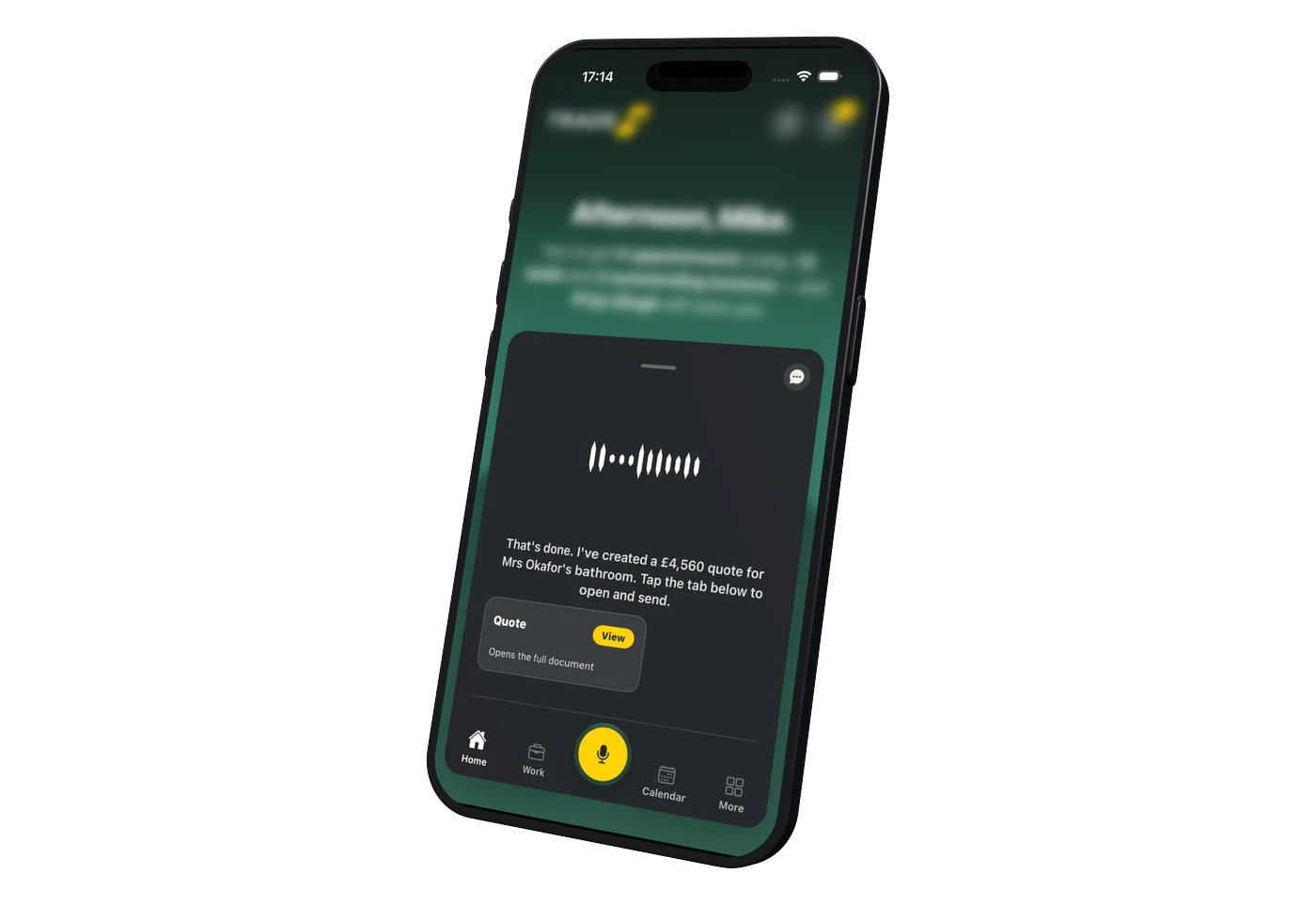
You say
“Quote Mrs Okafor three thousand eight hundred to fit the bathroom at 6 Elmwood Road. She is supplying the suite.”
A £4,560 itemised quote with VAT and your logo on it. You preview your quote to make sure you are happy, before sending to your customer by text, WhatsApp or your own custom branded email.

You say
“What should I be charging for the kitchen fit at 21 Sandhill Road?”
Quote Helper shows what the job costs you and what your expected profit would be, allowing you to quote with ease based on your own cost and pricing data. Units, worktop, tiling, labour, each with your costs versus what you charge your customer. You see the margin before you send it, not after the job is done.
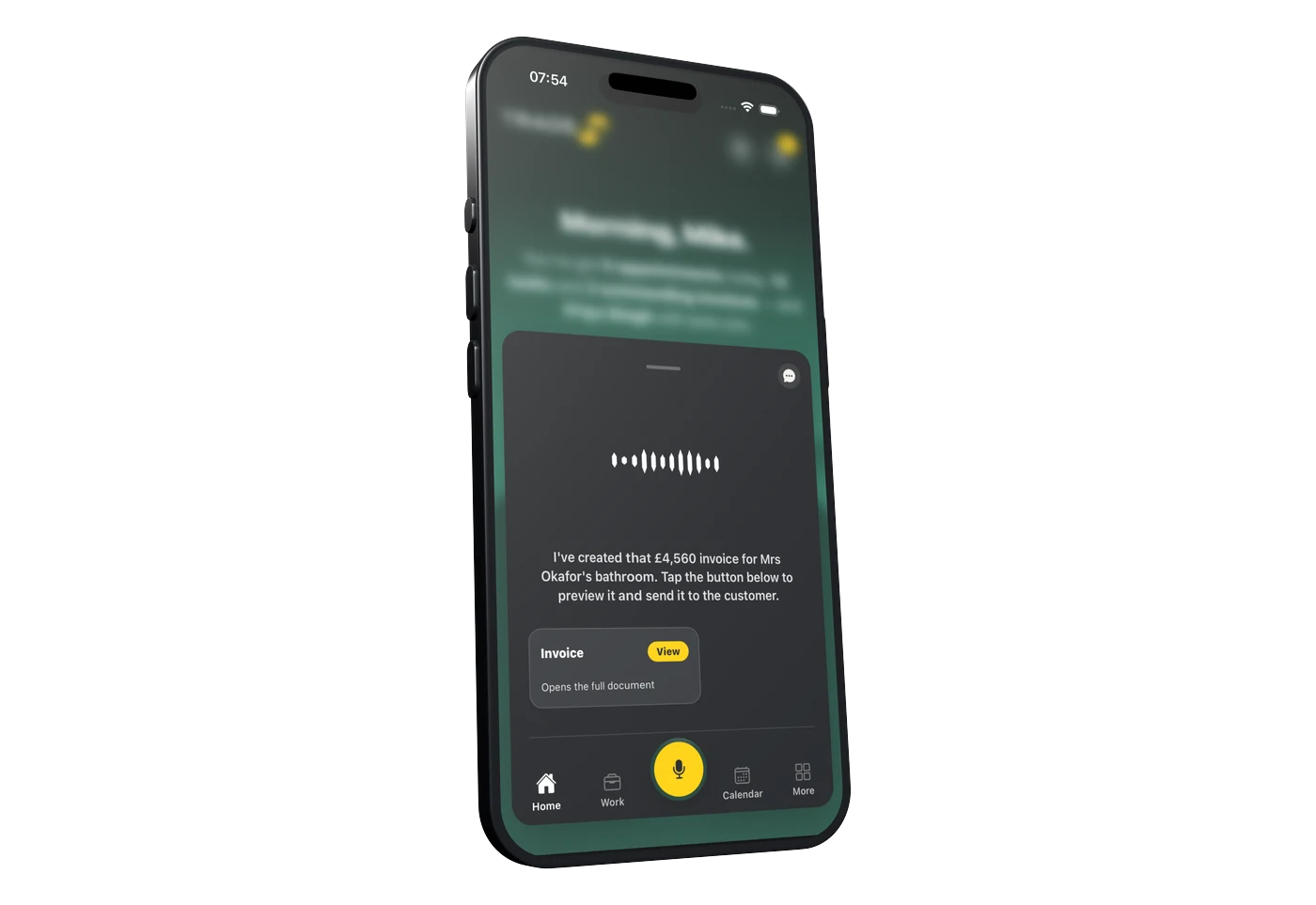
You say
“Elmwood Road is finished and she has signed it off. Invoice her the three thousand eight hundred plus VAT.”
Your PA updates that job and drafts the £4,560 invoice, ready for you to preview and send.

You say
“Who still owes me?”
Your PA already knows. Every invoice you have sent, what has landed and what has gone past its date. Your Trade PA writes the reminder and you tap send. Nothing goes to your customer that you have not okayed.
The paperwork
The extras are where the money goes missing
Nobody ever rips a bathroom out and finds exactly what they expected. Rotten floor under the bath. A waste that does not line up. Tiles that need the wall making good first. Every one of those is a separate line and a new version of the quote, so the price the customer is looking at is the one you actually meant. Then a sign-off at the end says the room is finished, before the invoice goes anywhere.

7–10 days
What a full bathroom usually takes once the making good and the tiling are counted, which is a long time to be carrying the materials yourself. Take a deposit against the job, log the part payment when it lands, and your PA works the balance out for you.
The sign-off
You talk to your PA, it writes the job sheet. Ready for them to sign.
01
It fills itself in
Your PA already has half of it
Pick the job and the customer, and the address and the work you logged come straight off it. Your PA asks you for whatever is missing and you answer as you would to a real person. The job sheet fills itself in as you talk.
02
Signed both ways
You sign it, then your customer does
You sign the job sheet where it needs it. Your customer can sign in person on your phone, or you email them a copy to sign on theirs. Once they have signed, the signed copy comes back onto the job for your records.
03
Kept for next time
It all stays on the job
Every quote, every invoice, every photo and the signed sheet all hang off that customer and that address. When they ring next year about the thing you did, it is one search, not a rummage through your camera roll.
The questions kitchen and bathroom fitters ask us
Certificates that aren’t yours. Money that is.
Paperwork
One refit puts more paperwork through the van than a month of small jobs, and half of it has somebody else’s name on it.
Do I need qualifications to fit kitchens and bathrooms?
No. It isn’t a regulated trade in the UK, so there’s no licence and no register you’re legally required to be on. An NVQ or a college ticket in fitted interiors is worth having, and you’ll want a CSCS card to get on most sites, but neither of those is the law. The notifiable bits are the exception: electrics, gas and unvented cylinders have to be done by someone registered for them.
Who issues the electrical certificate on a bathroom?
Your sparky, not you. Electrical work in a room with a bath or shower is notifiable under Part P in England, and so is any new circuit, which is most kitchens once the oven and hob go in. A new circuit gets an EIC; adding to an existing one gets a minor works certificate. TradePA can write those, but only if you hold the scheme membership yourself. Otherwise they stay locked, and you chase the paperwork off your sparky and hand it over with the manuals.
Is there anything I can sign off myself?
The job completion sign-off, and it needs no scheme membership at all. You sign as the fitter, then hand the phone to the customer and they sign on the screen. Both signatures go in the PDF with the date. Worth having when a snag list is the only thing between you and the last chunk of your money.
How do I prove the wet room was tanked properly?
Photos, dated, on the job. There’s no tanking certificate to issue, so the evidence is a set of pictures of the tanking before a single tile goes on, filed against that job with the customer and the address. Send them to your PA in chat and they land on the job. Three years on when there’s a stain on the ceiling below, you’re not scrolling through a camera roll.
What do I do with the snag list?
Say it as you walk round. “Add a note to the Henderson bathroom: silicone the bath end, replace the cracked tile by the door.” It sits on the job with a date on it, next to the photos and the invoices for that same job. Ask your PA to change one and it won’t, deliberately, in case it mishears you. You tidy notes yourself in the app.
Quoting
Labour and goods on their own lines. Every change dated, so there’s nothing to argue about at the end.
How do I quote supply and fit without doing it after work?
Say it stood in the room with the tape still in your hand. Labour on one line, goods on another, VAT at the bottom, on your own template with your logo. It writes it while you’re packing up and you read it in the van. The number you give looking at the job is always closer than the one you reconstruct on a Sunday.
She’s moved the sink. Do I redo the whole thing?
Change the line and it saves version two with a date on it. Version one stays on the job. The customer’s link always shows the latest, so they’re never reading an old price, and you’ve still got the trail if it gets questioned six weeks later.
Units are eight weeks out. Where does that go?
In the notes on the quote, which is the same field the customer reads. Lead times, what the deposit covers, what’s on order. Then put the fit date in the diary against the job so you’re not promising a start you haven’t got materials for, and the templater and second fix don’t land on top of each other.
How do I know what to charge when I’m not sure what I made last time?
Quote Helper. Pick a job you’ve already done and it pulls the materials, the expenses and the notes together, then shows what it cost you, what to charge and the margin, green or red. It’s a guide and it won’t write the quote for you. It will tell you the bathroom you thought was a good one wasn’t.
Can I keep my own prices in there?
Yes. Your Materials is your price list: what a thing costs you and what you charge for it. Add something to a job and it matches it against the list, or asks to link it and remembers your spelling next time. Photograph a supplier’s price list and it reads the table off the picture instead of you typing it in.
Money & the day
Four trades, six weeks, and your money spread across the whole of it.
How do I take a deposit before I order the units?
Say the figure and it writes the deposit invoice with a pay-by-card link on it. Tap send and he can pay off his phone before you place the order. It lands on the job as a part payment, so the balance still reads as owing, and a deposit can never close a job with money still out.
Can I invoice in stages: deposit, units in, second fix?
That’s what it’s built for. Mark the job part done and you get Invoice for work done; after that, Invoice next stage, and it works out what’s left. The job only goes to paid when every invoice on it is settled. So the last chunk sitting behind a snag list stays visible in red on the job page instead of quietly disappearing.
Templater Thursday, sparky Monday. How do I keep it straight?
Book each one in the diary against the job with the address on it. It warns you about overlaps and about tight gaps under half an hour, before it saves. Your customer gets a confirmation when you book and a reminder twenty-four hours before, from your business name, so nobody’s out when the templater turns up.
I sub for a builder. Does it do CIS?
Yes. Switch CIS on the invoice, pick 20% or 30%, then tick which lines are labour. Only the ticked lines get the deduction and the materials aren’t touched. Which is exactly why labour and goods want splitting when you write the quote in the first place.
What does it cost?
£10 a month, one plan, the lot switched on. No tiers, no per-user nonsense, no contract. Two weeks free and it doesn’t ask for a card. That’s £120 a year, which is less than most fitters write off on one job they never got round to invoicing. It’s on iPhone and Android, live on the App Store and Google Play.
One plan. The whole app.
TradePA
£10/mo
- Two weeks free, no card needed
- Every feature switched on, day one
- A tenner a month. That’s the whole price list.
- Cancel any time. No phone call needed.
